It’s the 24th of the month. Your accountant is retyping last week’s invoices into Excel for the VAT return. Meanwhile, the storekeeper is updating the stock register by hand, and the HR person is copying attendance into a salary sheet. Same business, same facts, typed three times. That is duplicate data entry, and almost every growing company in Nepal has some of it.
The good news is that you can fix it without hiring more people. In this guide, you’ll see where duplicate data entry hides, what it really costs, and how business software integration helps you enter each fact once. We’ll also show how Udyot ERP, a cloud business system built for Nepali companies, puts this into practice.
Key takeaways
✔  Duplicate data entry means typing the same information into more than one place.
✔  Every retyped number is a chance for an error, and errors show up at VAT time.
✔  Integrated software links sales, stock, accounts, payroll and banking, so one entry updates many records.
✔  Start with the flow that hurts most, usually sales to accounts, and expand from there.
What Duplicate Data Entry Looks Like in a Nepali Business
Most owners don’t notice it. It feels like normal office work. A customer buys goods, so you write a bill. Then someone enters that bill in the accounts. Later, someone else adjusts the stock. At month-end, a third person copies totals into the VAT sheet.
You’ll see the same pattern in other places too. A supplier bill gets typed once for payment and again for input VAT. Likewise, a new employee’s details sit in the HR file, the salary sheet and the PF form. And a WhatsApp message from a customer becomes a quotation, then a sales order, then an invoice, and each step starts from a blank page.
None of this is lazy work. It happens because the tools don’t talk to each other. A khata, an Excel file and a billing app each hold a piece of the story, so people carry the data between them by hand.
Why Duplicate Data Entry Costs More Than Time
Yes, retyping wastes hours. However, the bigger cost is trust in the numbers.
When one invoice lives in three files, those files will eventually disagree. The stock register says 34 units, the shelf says 31, and the books say something else. Then your team spends a day finding out why, instead of selling.
Errors also travel. A wrong amount typed into the accounts flows into your profit report and your VAT return. The VAT return is due by the 25th of the following Nepali month, according to the Inland Revenue Department, so there’s little time to hunt for a typing slip. Late filing brings fines and interest, as we explain in our guide to the VAT penalty for late filing in Nepal.
Finally, there’s the human cost. Skilled people end up as typists. Your accountant should be reading the numbers, not rebuilding them.
How Business Software Integration Works
Integration simply means your tools share one source of truth. Instead of five files, you keep one record of each customer, item, employee and transaction. Every module reads from that record.
So when you issue a sales invoice, the same entry feeds your ledger, your receivables and your VAT register. You don’t copy anything. You just look at it from a different angle.
There are two ways to get there. You can connect separate apps and sync them, which still leaves gaps and sync errors. Or you can use one integrated system built on a shared database. For most small and mid-sized Nepali companies, the second route is simpler, because there is nothing to sync in the first place.
Six Places Where Integration Ends Duplicate Data Entry
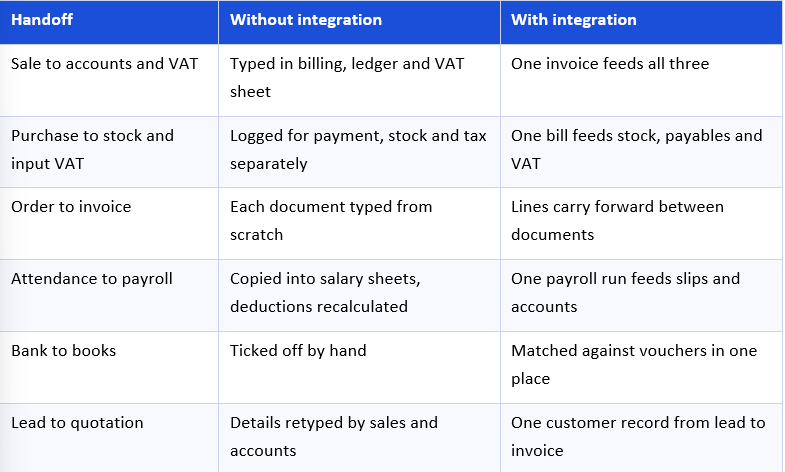
Let’s look at the six handoffs where retyping usually happens, and what changes when the software is connected.
1. Sales Invoice to Ledger and VAT Register
Without integration, the invoice is typed in a billing tool, then again in the accounts, then summed up for the VAT return. Three entries for one sale.
With integration, you create the invoice once. The accounting entry, the receivable and the VAT line all come from that single document. Your sales register stays up to date without a second pass.
Udyot tip: In Udyot, a sales invoice is a voucher in the same books that produce your profit and loss, balance sheet and VAT reports, so there's no separate register to maintain.2. Purchase Bill to Stock and Input VAT
A supplier delivers goods before Tihar. Someone logs the bill for payment. Someone else updates stock. Later, someone finds the bill again to claim input VAT.
Connected software records the purchase once. Stock, payables and input VAT all read from it. Also, you can’t forget to claim the credit, because the bill is already in the books.
Udyot tip: Receipt notes in Udyot confirm goods received and update stock, while the purchase side of the same flow feeds your VAT figures.3. Order to Delivery Challan to Invoice
Take a Rs 1,24,500 order from a hardware shop, as an example. It starts as a phone call, becomes a quotation, then a sales order, then a challan, then an invoice. If each document is typed from scratch, that’s four chances to mistype a quantity.
When documents are linked, you carry the same lines forward. The challan comes from the order, and the invoice comes from the challan. Customers see matching numbers at every step, which saves arguments later.
Udyot tip: Udyot lets you convert an order into an invoice with one click, and it generates delivery challans from the same order.4. Attendance to Payslip to PF, SSF and TDS
Payroll is a classic duplicate entry trap. Attendance sits in one sheet, salary structures in another, and deductions get recalculated by hand every month.
An integrated payroll module reads attendance and leave records, applies the salary structure, and calculates the deductions. Then the payslips and the payroll expense in your accounts come from the same run.
Udyot tip: Udyot's HR and payroll module calculates PF, SSF and TDS automatically and produces IRD-ready reports such as the Annex 5 and the TDS sheet.5. Bank Statement to Books
Many businesses download a statement, then tick off entries one by one against the cash book. It’s slow, and mismatches are easy to miss.
When your bank accounts live in the same system as your vouchers, reconciliation becomes a matching job rather than a typing job. You see what matches and what doesn’t. Locking a reconciled period also stops anyone from quietly backdating entries.
6. Lead to Quotation to Customer
Sales teams often keep leads in a notebook or a phone contact list, then retype the details into a quotation. Later, the accounts team retypes them again to create the customer.
A connected CRM keeps one customer record from first call to first invoice. You turn a lead into a quotation without re-entering the name, the contact or the items.
Udyot tip: Udyot's CRM tracks leads on a pipeline and generates quotations from them, so the details travel with the customer.Quick Summary: Where Retyping Disappears
How Udyot Reduces Duplicate Data Entry
Udyot is built around the idea that your business data should live in one place. According to its own features page, it offers 11 modules, from accounting and inventory to HR, payroll, CRM and POS, and you can use only the ones you need.
Here’s how that helps you cut duplicate data entry in practice:
- One set of books. Accounting, inventory, orders, banking and tax share the same data, so reports update as work happens.
- VAT from your transactions. The monthly VAT return is auto-filled from your records, and you can export the Annex 1 to 9 reports to Excel in IRD formats.
- Automatic payroll deductions. PF, SSF and TDS are calculated from your salary structures, not retyped each month.
- Linked documents. Orders convert to invoices in one click, so quantities and rates move forward unchanged.
- IRD-verified billing. Udyot is verified under the Electronic Billing Procedure 2074 and supports CBMS reporting, which you can switch on per company. See the IRD verification details.
- A clear audit trail. Every change is logged with the user and the time, so you can trace any figure back to its source.