
Almost every Nepali business starts in a spreadsheet. A shop owner tracks sales in one file, stock in another, and salaries on a third tab. It works, and it costs nothing. So when should a business move beyond Excel?
The honest answer is: when the sheet starts costing you more than software would. That moment is different for every business. However, it usually shows up as a handful of very recognisable problems, and you can spot them early.
In this guide, you’ll see 9 clear signs that it’s time to move beyond Excel. You’ll also learn when Excel is still the right tool, and how Udyot ERP helps Nepali businesses make the switch without chaos.
Key takeaways
✔  Excel is great for small, simple, single-person work. It struggles when many people, many items and tax rules meet in one file.
✔  The clearest signs are version confusion, stock mismatches, slow VAT filing, untracked udharo and payroll mistakes.
✔  You don't need a big IT project. A connected system for accounts, stock, VAT and payroll is enough for most SMEs.
✔  Test the new system on a free trial before you commit.
Why Excel Works So Well (Until It Doesn’t)
Let’s be fair to Excel. It’s flexible, familiar and quick to set up. Your accountant knows it, and so does your cousin who “is good with computers”. For a new shop or a one-person service business, that is exactly what you need.
The trouble starts when the business grows. More customers, more items, more staff and more IRD paperwork all land in the same file. Excel was built as a personal tool, not as a shared system with controls. Researchers who study spreadsheet risk, including the work reported through EuSpRIG, have repeatedly found errors in a large share of the business spreadsheets they audit. The bigger and more complex the file, the more likely a mistake hides inside.
That’s why the question isn’t “Is Excel bad?” Instead, ask: “Is my sheet still safe to run the business on, or is it time to move beyond Excel?”
9 Signs It’s Time to Move Beyond Excel
Here are the warning signs, in no particular order. If you recognise three or more, it’s probably time to move beyond Excel.
Sign 1: Nobody Knows Which File Is the Latest
Picture this. There’s Sales_Final.xlsx, Sales_Final_v2.xlsx and Sales_Final_REAL.xlsx. Your accountant has one, your manager has another, and you’re looking at a third.
When several people copy and edit the same workbook, the numbers drift apart. Then you spend Monday morning arguing about which total is right instead of running the business.
The fix: keep one live source of truth that everyone works in, with the same numbers on every screen.
Udyot tip: Udyot is cloud-based, so your team works in one system instead of emailing files back and forth. Role-based access lets you decide who can view, enter or approve.Sign 2: Your Stock Sheet and Your Godown Disagree
The sheet says 40 cartons. The shelf shows 12. Which number do you trust before Dashain?
In fact, stock sheets fall behind because someone has to update them by hand after every sale, purchase and return. If you miss a few entries, the gap grows quietly. As a result, you either overstock and tie up cash, or run out and lose sales.
The fix: link every sale and purchase directly to stock, and do regular physical counts. If this sounds familiar, our guide on why accurate business data matters goes deeper.
Udyot tip: Udyot tracks stock across multiple warehouses (godowns), supports physical stock counts with variance tracking, and sends low-stock alerts when an item falls below its reorder point.Sign 3: VAT Filing Takes Days, So Move Beyond Excel
Every month, someone sits with sales bills, purchase bills and a calculator. They match invoices, check PAN numbers, total the output VAT, subtract the input VAT and build the annexes by hand.
The process is slow, and it’s risky. One missed purchase bill means lost input credit. One wrong figure can mean questions from the tax office. Also, the IRD is moving businesses toward digital billing, which our explainer on what CBMS is covers in plain language.
The fix: record every invoice once, correctly, and let the system produce the VAT figures. Always confirm current rules and deadlines on the IRD website. Our VAT filing guide walks through the steps.
Udyot tip: Udyot calculates VAT at 13%, produces the VAT return from your transactions, and exports Annex 1 to 9 reports in IRD-accepted formats for Excel export and upload.Sign 4: Udharo Lives in a Notebook (or a Forgotten Tab)
Udharo is part of business in Nepal. Regular customers expect it. The problem isn’t giving credit. It’s losing track of who owes what and since when.
When dues sit in a sheet that nobody updates, reminders get missed. Small unpaid amounts then pile up into a real hole in your cash. Worse, you can’t say with confidence how much money is waiting outside the business.
The fix: keep a ledger for every customer, with due dates, and review overdue amounts every week.
Udyot tip: Udyot keeps customer and supplier ledgers, with receivables and payables visible on your dashboard, so you see dues at a glance.Sign 5: The File Is Slow, Heavy or Crashing
Does your workbook take a minute to open? Does it freeze when you add a formula? That’s a technical warning, so it’s easy to ignore until the day the file corrupts.
Excel also has hard limits. A single worksheet holds just over one million rows. A busy retail counter or distributor can fill that faster than you’d think, especially when every line item is a row. Long before you hit the limit, however, heavy formulas make the file fragile.
The fix: move transactions into a system built to handle volume, with automatic backups.
Udyot tip: Udyot runs in the cloud, and the plans include hourly data backups, so one broken file can't take your records down with it.Sign 6: Only One Person Understands the Formulas
Every spreadsheet-run business has “the person who built the sheet”. They know which cell feeds which total. Nobody else dares to touch it.
However, that’s a business risk. If that person goes on leave, changes jobs or makes an honest slip, the whole process wobbles. For example, spreadsheet research shows most errors come from faulty logic, not typing mistakes, and logic errors are the hardest ones to see.
The fix: use standard accounting structures, such as vouchers, ledgers and a chart of accounts, that any trained accountant can read.
Udyot tip: Udyot follows double-entry accounting with a hierarchical chart of accounts and all the usual voucher types, so a new accountant can pick it up without decoding someone's formulas.Sign 7: You Can’t Tell Who Changed What
Someone edited last quarter’s figure. Was it a correction, or a mistake? With a shared spreadsheet, you often can’t say.
Without an audit trail, you can’t trace errors, settle disputes or show an auditor how a number came to be. Moreover, anyone with the file can backdate an entry.
The fix: use a system that logs every change with the user and the time, and that lets you lock closed periods.
Udyot tip: Udyot keeps an audit trail of every change and supports period closing, so finished months stay finished.Sign 8: Payroll Day Pushes You to Move Beyond Excel
Salary day looks simple until you add allowances, leave, overtime, PF, SSF and TDS for every employee. However, past 5 to 10 staff, manual calculation gets error-prone fast.
One wrong payslip damages trust in minutes. Also, late deposits can bring penalties. So payroll is often the moment owners finally decide to move beyond Excel.
The fix: set up proper salary structures, record attendance in one place and automate the calculations. Rates and slabs change, so verify them with the IRD or your CA each fiscal year.
Udyot tip: Udyot's HR and payroll module handles attendance, leaves, salary structures and automatic PF, SSF and TDS calculation, then prints payslips and the IRD-ready reports.Sign 9: You’re Growing Into Branches, Warehouses or Several Companies
Think of a second outlet, a new godown in Birgunj or a separate company for the trading side. Each addition multiplies your spreadsheets, and consolidating them becomes a monthly project.
So at this stage, you need one view across everything, not ten files stitched together by hand. Decisions about pricing, purchasing and hiring depend on numbers you can trust the same day, not next week.
The fix: choose a system that handles several warehouses and companies under one login.
Udyot tip: Udyot supports multi-company management from one login and multi-warehouse inventory, and uses the Nepali (BS) calendar and fiscal year throughout.Quick Checklist: Is It Time to Move Beyond Excel?
Not sure how many signs apply to you? Use this table as a quick self-check.
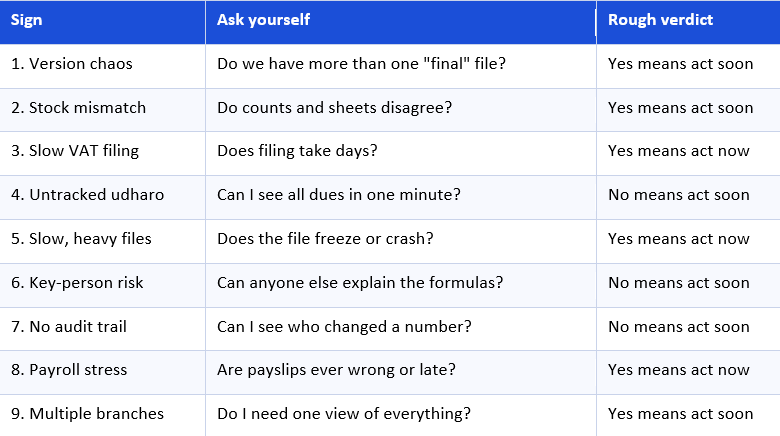
If you answered “act now” on even one row, start a free trial this month rather than next year.
When It’s Fine Not to Move Beyond Excel
Sometimes, however, the best advice is to wait. Excel is still a sensible choice if you work alone, run a small and simple business, file few invoices and have no staff payroll. A budget, a quick forecast or a one-off analysis also belongs in a spreadsheet.
In fact, many businesses keep Excel for analysis even after they adopt an ERP. The two aren’t enemies. Instead, the difference is where your daily records live. Transactions, stock, VAT and payroll belong in a controlled system. Experiments and what-if models can stay in Excel.
How to Move Beyond Excel Without Disrupting Your Business
Switching sounds scary, but a careful plan keeps it calm. Here’s how to move beyond Excel step by step. This simple sequence works for most small and mid-sized businesses.
1. List what you track today. Sales, purchases, stock, dues, payroll, VAT. Note which sheet each one lives in.
2. Clean the data first. Remove duplicates and fix item names. Messy data stays messy in any system.
3. Pick a quiet start date. The first day of a month or a new fiscal quarter is easier than the week before Dashain.
4. Run the new system in parallel for a short while. Compare its reports with your sheets until you trust them.
5. Train your team. Show each person only the screens they need.
Finally, ask your accountant or CA to review the setup. That way, you won’t be fixing it later.
How Udyot ERP Helps You Move Beyond Excel
Knowing the signs is the easy part. Acting on them is harder, so that’s where the right software helps.
Udyot ERP is a cloud-based business system built for Nepali businesses. Instead of five sheets, you work in one place. Here’s what that gives you:
- Accounting that stays current: double-entry accounting with real-time profit and loss and balance sheet reports.
- Nepal-ready tax tools: VAT at 13%, TDS returns and Annex 1 to 9 reports in IRD-accepted formats, with Excel export. See the IRD verification page.
- Stock you can trust: multiple warehouses, physical counts, FIFO or weighted average valuation and low-stock alerts.
- HR and payroll: attendance, leaves, salary structures, and automatic PF, SSF and TDS.
- Growth-ready: CRM, supply chain, POS, services and manufacturing modules, plus multi-company support.
- Safe by design: role-based access, an audit trail and hourly backups.
Curious about the details? Browse the full feature list or compare the pricing plans. Even better, try it on your own data first.