
Imagine you’re about to order stock for Dashain. Your system says you have 40 cartons. The shelf shows 12. Which number do you trust? That small doubt is exactly why every owner needs accurate business data before making a big decision.
You make decisions all day. You set prices, buy stock, give credit, hire staff, and plan expansion. Each choice rests on numbers. So if the numbers are wrong, even a smart decision goes wrong.
In this guide, you’ll learn what accurate business data really means, how bad data quietly costs money, and seven simple ways to fix it. We’ll also show, briefly, how Udyot ERP helps you keep your numbers right.
Key takeaways
✔  Every business decision rests on numbers. Wrong numbers lead to wrong decisions.
✔  Bad data costs money quietly through overstock, lost sales, bad debts, and penalties.
✔  Good data is correct, current, complete, consistent, and traceable.
✔  One connected system beats scattered notebooks and spreadsheets.
What Counts as Accurate Business Data?
Accurate business data is information you can trust enough to act on. It isn’t about having more numbers. Instead, it’s about having the right ones. In practice, good data has five qualities:
- Correct. The figures match reality. Ten units in the system means ten units on the shelf.
- Current. The numbers reflect today, not last month. Old data can be worse than no data.
- Complete. Nothing is missing. Every bill, expense, and payment is recorded.
- Consistent. The same item has the same name, unit, and price everywhere.
- Traceable. You can see where a number came from, so you can check it.
If even one of these fails, your reports start telling a slightly different story from the truth. And slight differences grow quickly.
How Inaccurate Data Leads to Wrong Decisions
Bad data rarely announces itself. Instead, it hides inside everyday choices. Then it shows up later as a cash shortage, a tax penalty, or a surprise loss.
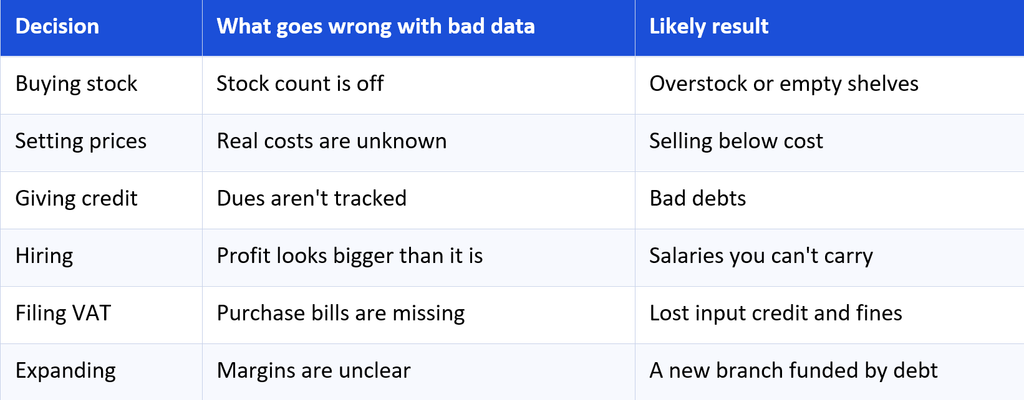
Notice the pattern. In each case, the owner isn’t careless. Instead, the owner acted on numbers that looked right but weren’t.
Why Accurate Business Data Matters Even More in Nepal
In Nepal, margins are often thin. Therefore, a small error can wipe out a month’s profit. Several local realities raise the stakes even further.
First, udharo is common, so unpaid dues can pile up unnoticed. Also, festival seasons like Dashain and Tihar push owners to buy and sell in bulk, often on instinct. In addition, VAT returns come around every month, and the IRD expects proper invoices and records. You can confirm the current requirements on the IRD website.
Finally, banks and investors ask for clean financial statements before they lend. If your books are messy, a good opportunity can slip away. So accurate business data isn’t a luxury. It’s the base for credit, compliance, and growth.
Signs You Don’t Have Accurate Business Data
Not sure where you stand? Then check these common warning signs.
- Your staff members quote different numbers for the same thing.
- Your stock count never matches the system.
- Month-end closing takes days, not hours.
- Your CA keeps asking for missing bills.
- You can’t say how much you earned on a single product.
- Profit surprises you, in either direction.
If you nodded at two or more, don’t worry. Most growing businesses go through this stage. The next section shows how to move past it.
Accurate Business Data in Action: A Simple Example
Consider two grocery shop owners preparing for Dashain. Both want to reorder rice. (This is an illustrative story, not real data.)
Owner A relies on memory and a notebook. He believes 30 sacks are left, so he orders only 10 more. In reality, just 12 sacks remain, because several sales were never written down. During festival week, he runs out, and customers walk to the next shop.
Owner B uses a system that records every sale as it happens. It shows 12 sacks and a rising sales trend. So he orders early, in the right quantity, and keeps his shelves full.
Both owners work equally hard. Still, only one of them decided based on accurate business data.
7 Ways to Get Accurate Business Data
You don’t need a big budget to improve your data. You need good habits first, and then the right tools.
Step 1: Record Everything at the Moment It Happens
Data goes wrong when it waits. Otherwise, a bill noted tomorrow becomes a bill forgotten next week. So enter sales, purchases, and expenses on the day they happen.
Step 2: Use One Source of Truth
When billing lives in one app, stock in Excel, and expenses in a notebook, numbers will clash. Instead, keep all records in one place. Then everyone works from the same figures.
Udyot tip: Accounting, inventory, HR, payroll, and VAT share one system, so a single sale updates stock, ledgers, and the customer's dues together.Step 3: Standardise Names, Units, and Formats
“Sugar 1kg”, “Sugar (1 kg)”, and “sugar 1kg pkt” look like three items. Choose one name, one unit, and one format for each product. The cleanup takes time, but it pays off in every report afterwards.
Step 4: Reconcile Regularly
Check your records against reality. Compare bank statements with your cash book, supplier statements with your payables, and shelf counts with your stock records. Weekly checks catch small gaps before they grow.
Udyot tip: Physical stock counts let you compare what's on the shelf with what the system says, so differences show up quickly.Step 5: Keep Personal and Business Money Apart
Mixed accounts blur your real profit. Use a separate business account, pay yourself a fixed salary, and record every withdrawal. As a result, your profit figure means something.
Step 6: Decide Who Enters and Who Approves
Mistakes multiply when everyone can change everything. So give clear roles. Let one person record, and another review. Also, ask a simple question whenever a number looks odd: where did this come from?
Step 7: Review Reports on a Schedule
Accurate data only helps if you look at it. Check cash and dues weekly, and profit and loss every month. Meanwhile, compare each month with the last, and chase down surprises.
Udyot tip: Reports update as you work, so you can check numbers any day, even from your phone with the mobile app.A Quick Checklist Before You Make Any Big Decision
Before you buy, hire, discount, or expand, pause and ask these questions:
- Is my stock count current?
- Do I know my real cost and margin on this item?
- Who owes me money, and for how long?
- What is my cash position this week?
- Are all my purchase bills recorded?
- Do my records match the bank?
If you can answer all six with confidence, go ahead. If not, fix the gap first. After all, a day spent checking numbers is cheaper than a month spent fixing a bad decision.
How Udyot ERP Helps You Keep Accurate Business Data
Everything above gets easier when your records live in one connected system. That’s the idea behind an ERP. Here’s a quick glimpse of how it works in Udyot ERP, following one purchase and one sale:
- A purchase is recorded. Stock goes up, and the supplier’s payable posts to your accounts.
- A sale is billed. A VAT invoice is created, stock goes down, and the customer’s ledger updates.
- A payment arrives. The due clears, and your cash or bank balance changes.
- Stock is counted. You compare the shelf with the system and spot any difference.
- Reports are ready. Profit and loss, stock, and dues views reflect each entry, and VAT reports follow IRD formats.
Because every entry feeds the same records, you type each fact once. That alone removes a major source of errors. In addition, Udyot is cloud-based, uses Bikram Sambat dates, and lets you import existing data from Tally or Excel. So you don’t start from zero. Browse the full feature list, or learn how Udyot handles IRD compliance.