Udyot ERP
Home
Modules
AccountInventoryOrder ManagementHuman ResourcesManufacturingCRMServicesPoint of SaleSupply ChainPharmacyRestaurantClinic
FeaturesPricingDocsBlogAboutContactConfirmation Letter Sign In
Home Docs HR & Payroll How to Add Branches in the HRMS Module – Udyot ERP
Getting Started
Accounting
VAT & Tax
HR & Payroll How to Add Branches in the HRMS Module – Udyot ERP How to create a Department in the HRMS Module - Udyot ERP How to Create a Designation in the HRMS Module – Udyot ERP Setting Up Employees Leave Management Salary Structures and Payroll Processing TDS on Salaries Statutory Returns: EPF, SSF and Annex-10 Employee Loans and Advances Employee Self-Service Portal
Inventory
CRM
Reports & Analytics
Settings
Order Management
Supply Chain (SCM)
Manufacturing
Billing & Subscription
User Guide
Point of Sale
Services
Developer Reference
Integrations
Troubleshooting
HR & Payroll
Updated November 2, 2026

How to Add Branches in the HRMS Module – Udyot ERP

Add Branches

  1. Click on the Human Resources Module
udyot erp hr module

2. Click on Organization

3. Click on Branches
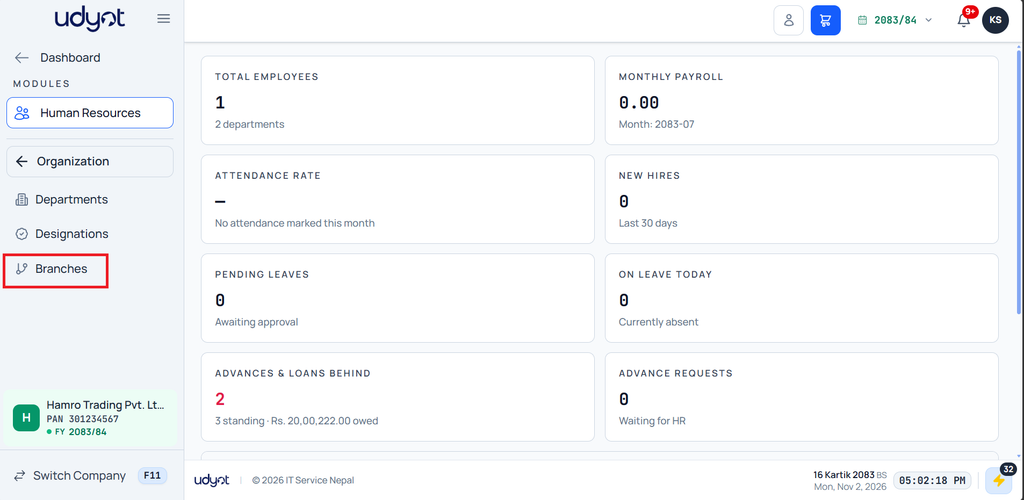
4. Click on the + icon in the top-right corner.

5. Enter Branch Name, Code, Phone number, Full Address, check the box if it’s the Main Branch, and click Save Branch

⬇ Download Documentation
Next → How to create a Department in the HRMS Module – Udyot ERP

Was this article helpful?

Need more help? Contact our support team

From the blog

  • Why Business Owners Need Accurate Business Data Before Making Decisions
  • SSF vs EPF in Nepal — Which Applies, and What Changes in Payroll
  • The Rise of Small Business ERP in Nepal
Udyot ERP

All-in-One Nepal ERP: IRD-Verified Accounting, HR, Payroll, CRM, POS Software in Nepal

+977-21571474
Product
FeaturesPricingIRD Verified ✓
Company
HomeBlogAbout UsCustomer Stories
Support
DocumentationFAQContact SupportEmail Support
© 2026 IT Service Nepal Pvt. Ltd. All rights reserved. Registered in Nepal.
Privacy Policy Terms of Service
This website uses cookies to improve your experience.