Updated
How to set up a company for a pharmacy
Company
A company in Udyot ERP represents your pharmacy business and serves as the foundation for managing all pharmacy operations. After creating a company, you can manage medicines and healthcare products, maintain stock and batch details, track expiry dates, manage customers and suppliers, record purchases and sales, generate bills, and maintain financial accounts. Each company stores its own business data, inventory records, financial settings, fiscal year, tax information, and user permissions securely and independently.
Company setup for pharmacy
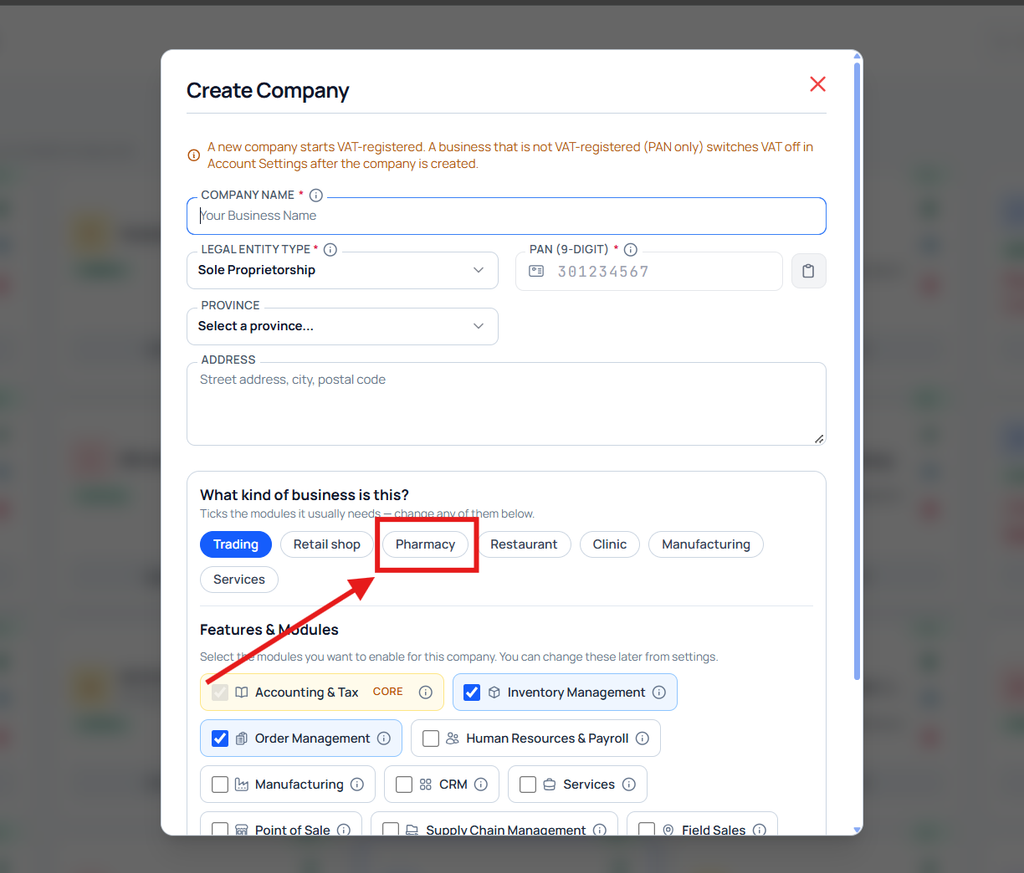
1. Click on Create Your First Company, or if you already have companies, click on Switch Company/press F11, then click on + New Company

2. Fill in the information and click on the pharmacy in ” What kind of business is this?